If you have installed a TV antenna that was working good one day and now is having issue there can be several causes.
Antennas don’t really “break” overnight. Something around them changed.
Here are the most common reasons a TV antenna stops working from one day to the next, and what to do about each.
What Is Happening When TV Channels Disappear?
Over-the-air TV is a radio signal. Your antenna pulls that signal out of the air and feeds it to your TV through a coax cable.
If anything in that chain shifts, even slightly, the signal can drop below what your tuner needs to lock on. That’s when channels go missing or start breaking up.
The signal is either strong enough or it isn’t. There’s not much middle ground with digital TV, which is why a channel can look perfect one day and be unwatchable the next.
Common Things To Check
- Newly installed LED and CFL (Compact Fluorescent) bulbs
- Nearby electrical interference
- Weather changes (Even at a distance)
- The antenna moved or shifted
- A loose or damaged coax connection
- New obstruction between you and the towers
- Broadcast tower maintenance or a channel rescan
- Power issue with an amplified antenna
- TV input or tuner setting changed
Things to Check When An Antenna Randomly Stops Working
- Has New LED Light Bulbs Been Installed?
- Has the Antenna Moved?
- Check The Weather
- Inspect The Coax Cable
- Check For New Obstructions
- Check The TV Input And Settings
- Run A New Channel Rescan
- Check For Interference
- Check Power To An Amplified Antenna
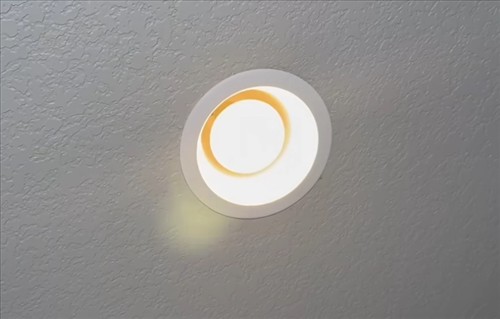
A very common problems is when new light bulbs are used to replace a burnt out bulb and the TV signal now has issues.
Many homeowners never think a light bulb can cause issues with a TV antenna but certain bulbs can be problematic.
The main bulbs that can cause problems is Budget LED and CFL (Compact Fluorescent) bulbs. This can emit electromagnetic and radio frequency interference that disrupts Over-The-Air (OTA) TV signals.
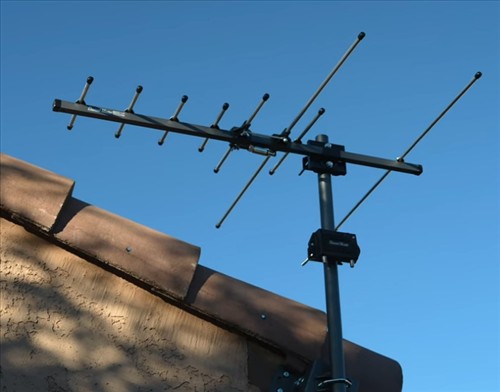
If it’s an outdoor or attic antenna, wind can twist it off-aim. Even a few degrees can matter.
For an indoor antenna, check if someone bumped it, moved it, or set something on top of it. A laptop, a phone, or a metal object placed nearby can disrupt reception.
Bad weather, even not local but in the distance, can affect a TV signal.
Heavy rain, snow, dense cloud cover, and high winds can all weaken reception. So can heat and humidity changes that affect how signals travel.
If the weather is rough today and was clear yesterday, that’s likely your answer. Reception usually returns once conditions settle.
Walk the cable from the antenna to the TV. Look for kinks, cuts, or a connector that has worked itself loose.
Unscrew both ends and screw them back on firmly by hand. A connection that looks tight can still be a fraction of a turn away from failing.
Trees grow. Leaves come in during spring. A neighbor may have parked an RV next door or put up a new structure.
Anything new between your antenna and the broadcast towers, especially metal, can block or reflect signals.
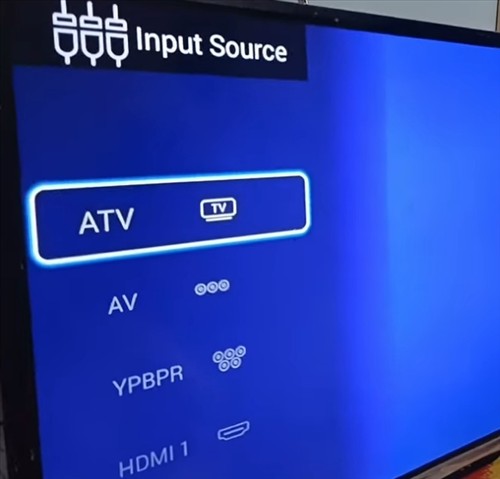
Make sure the TV is set to the antenna or “Air” input, not cable. If someone used the TV for streaming or gaming and changed the input source, the antenna channels won’t show up.
Broadcasters sometimes change frequencies. When that happens, your TV doesn’t know the new channel exists until you rescan.
Go into your TV menu and run a fresh channel scan. This is one of the most common fixes, and it costs nothing to try.
LED lights, phone chargers, routers, and other electronics can throw off signals when they’re close to the antenna or cable. A new device plugged in yesterday could be the culprit.
Unplug nearby electronics one at a time and see if reception improves.
If your antenna has a built-in amplifier or preamp, it needs power. A USB cable that came loose or a power adapter that quit will kill your signal completely.
Confirm the amplifier is plugged in and the light, if it has one, is on.
Can A Broadcast Tower Be The Problem?
Yes. Stations occasionally take their transmitters down for maintenance, repairs, or upgrades.
If only one or two channels are missing while the rest work fine, the issue is likely on the broadcaster’s end. Most station websites post outage notices.
Why Do Channels Come And Go Throughout The Day?
Signals travel differently as the atmosphere heats up and cools down. This is called tropospheric ducting, and it can make distant stations appear at night and vanish by morning, or the other way around.
If your reception drifts in and out on a daily cycle, you’re likely on the edge of a station’s coverage area. A higher or better-aimed antenna usually helps.
Do I Need A New Antenna?
Probably not. Most “it worked yesterday” problems trace back to a loose cable, weather, a missed rescan, or a small shift in position.
Only consider a new antenna if you’ve ruled everything else out and you’re consistently losing channels you used to receive reliably.
Summary
Antennas rarely fail on their own. When channels vanish overnight, something around the antenna almost always changed.
Start with the easy stuff. Check the weather, the cable connections, and the antenna’s position.
Run a channel rescan. Look for new obstructions or electronics that weren’t there yesterday.
If your antenna is amplified, make sure it has power. If only one channel is affected, check whether the broadcaster is having issues.
Most of the time, one of these steps brings your channels back within a few minutes.
Have you run into this with your antenna? Let us know what fixed it for you below.