
- How To Install PVR IPTV Simple Client Kodi Addon
- How To Use PVR IPTV Simple Client
- Best Free M3U Playlist URLs 2026
- How To Setup PVR IPTV Simple Client and Add a M3U link (Movie TV Shows)
PVR IPTV Simple Client is an interface that allows IPTV Playlists to be added to Kodi for viewing video streams.
IPTV (Internet Protocol Television) is a way to watch live video streams on the internet.
Kodi Simple Client add-on is a very good IPTV plugin and a good way to add a favorite IPTV to Kodi.
Unlike most other addons that scrape the internet for free links or use paid links, IPTV sends a feed from a URL link called an M3U playlist.

An M3U playlist link will need to be added to IPTV Simple Client for it to populate TV channels and work.
If you do not have an IPTV M3U Playlist URL, the top free ones are listed below.
Simple Client is located in the default Kodi add-on repository which comes automatically with every installation.
*WirelesSHack.org has No affiliation with Kodi, any Addons, Repos, or Builds and does not host, distribute, or provide IPTV streams or playlists. Any example playlist URLs are provided for publicly available, authorized content only. Users are responsible for ensuring they have the legal right to access any content they view.
PVR IPTV Simple Client Location and Info
- Addon Name: PVR IPTV Simple Client
- Repo Name: Default Kodi Addon Repository
- Kodi Version Compatibility: 20 Nexus and 21 Omega
How To Install PVR IPTV Simple Client Kodi Addon
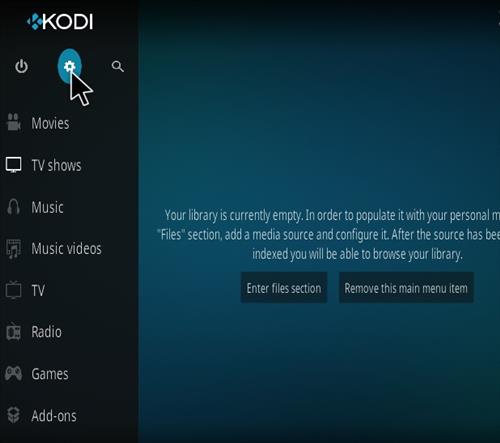
- At the top left click the System Settings (Gear Icon)
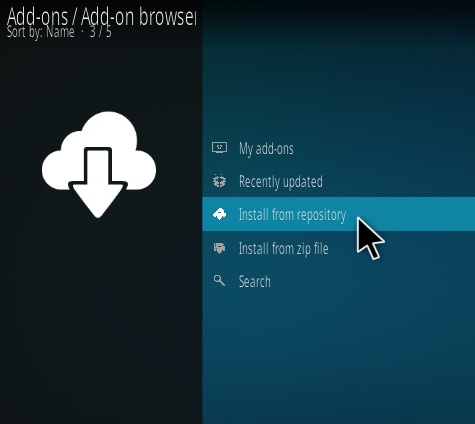
- Click Install from repository
- Find and Click Kodi Addon Repository
- PVR Clients
- Click IPTV Simple Client
- Click Install


How To Use PVR IPTV Simple Client
After installing PVR IPTV Simple Client it will be located under My add-ons PVR Clients.
An IPTV M3U Playlist URL link needs to be added for it to work or it will be blank.
If you have a M3U Playlist URL link simply add it at step 7 below.
If you do not have an M3U URL, here are the best current free options for 2026.
Best Free M3U Playlist URLs 2026
- Samsung TV Plus M3U Playlist URL:
https://apsattv.com/ssungusa.m3u - The Roku Channel M3U Playlist URL:
https://raw.githubusercontent.com/BuddyChewChew/app-m3u-generator/refs/heads/main/playlists/roku_all.m3u - Pluto TV M3U Playlist URL:
https://raw.githubusercontent.com/BuddyChewChew/app-m3u-generator/refs/heads/main/playlists/plutotv_us.m3u - LG Channels M3U Playlist URL:
https://www.apsattv.com/lg.m3u - Vizio TV WatchFree M3U Playlist URL
https://www.apsattv.com/vizio.m3u
How To Setup PVR IPTV Simple Client and Add a M3U link (Movies TV Shows)
- Go To Add-ons –> My add-ons and Select PRV Clients
- Select PVR IPTV Simple Client
- Select Configure
- Select Add add-on configuration
- Select M3U playlist URL
- For movies and TV shows Enter in the M3U URL https://apsattv.com/ssungusa.m3u and click OK
- After click OK and going back Kodi will close to repopulate with the M3U file.
- Start Kodi Again and go to TV section
- Select All Channels which bring up a TV guide for whats is available


i need hindi indian live channels