How To Get Local TV Channels Without Cable for Free

By | September 28, 2026

How To Get Local TV Channels Without Cable for Free
If you want to receive local TV channels but do not want to pay for cable, there are two main ways to do it.

The first is with an antenna, which does not need the internet at all, and the second is with streaming apps, which do need an internet connection.

Both options have their good and bad points, and many people end up using a mix of both.

Jump to a Section:

Local TV Channels Without the Internet: Using an Antenna

Local TV channels can be picked up for free using an antenna, with no internet or monthly bill needed.

Local TV channels have been transmitted over the air for many years, with many channels available.

In fact, over-the-air TV channels are better now than ever before, since all full-power stations have broadcast in digital since 2009, with most major networks sending out their main channel in HD.

Many stations are now also broadcasting the newer NextGen TV standard, which can carry an even better picture and sound.

Best of all, it is free; this means popular channels such as CBS, NBC, FOX, and a host of other channels can be picked up for free over the air.
Some can remember the old days of large rabbit ear antennas that would pick up grainy pictures and could be moved around to adjust a picture.

The problem with the old rabbit-ear antenna days was TV signals were broadcast in analog, which didn’t have very good resolution and had problems displaying images.

Major broadcast TV stations have long since switched to high resolution digital HDTV signals.

To receive an HDTV signal, all that is needed is a digital HDTV antenna. Read Here for Top Antennas.

A TV that can decode a digital signal is also needed, but any TV sold in the U.S. since 2007 should have a digital tuner built in.

If your TV does not have a decoder built in, an HDTV TV Tuner box can always be bought, they can also be a nice upgrade, since many newer tuner boxes can also pick up NextGen TV channels and record shows.

How Many Channels Can You Get for Free With an Antenna?

This will depend on your location and how far you live from TV broadcast towers.

Most big cities will have around 50-100 channels or more when counting sub-channels, while smaller cities will usually have 20-30 stations.

One way to boost how many stations you can receive is to get a good outdoor antenna that can boost a signal greatly.

The terrain is also a factor, with a home on a flat terrain able to receive from farther away than a home that has lots of obstacles such as mountains and trees.

What Channels are Broadcast for Free?
What Channels Are Broadcast For Free 2
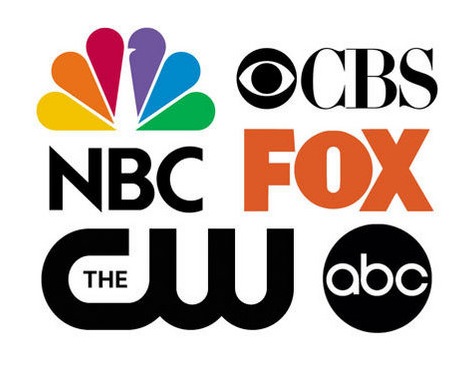
All major networks such as ABC, CBS, NBC, FOX, PBS, and CW are all sent out over-the-air free of charge.

Other networks such as ION, MyNetworkTV, Univision, and Telemundo are also broadcast for free in many areas.

Depending on your locality, many smaller local stations will also transmit, along with sub-channels that show classic TV shows and movies such as MeTV, Antenna TV, and Grit.

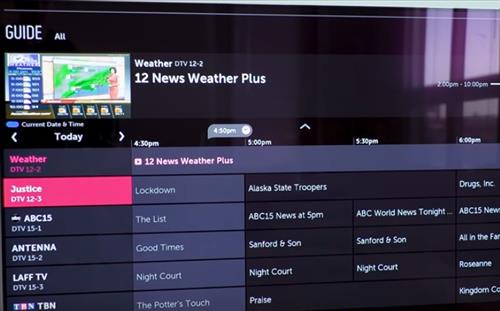
For example, in my area, local news and other small networks send out a signal along with a local weather channel.

The best way to see what is available in your area is to use the free FCC DTV Reception Maps, which will list the stations near your address along with how strong the signal is.

The free TV Guide app or their website here can also be set to show antenna listings for your area.

Looking at the available TV channels will tell you the number of channels in your area.

What Kind of TV Shows are Broadcast for Free?

Most know the type of shows that are shown on the major networks, such as FOX has the Simpsons and other programs.

Local news, prime time shows, and many big sporting events such as NFL football are also shown over the air for free.

Often free over-the-air stations are found at the lower end of a cable subscription and can count for a 1/3 to a 1/2 of the channels.

Channels that can not be picked up over the air are cable-only channels such as Comedy Central, Syfy, ESPN, and 24-hour network news channels.

How To Set Up an Antenna for Local TV Channels

How To Get Local TV Channels.
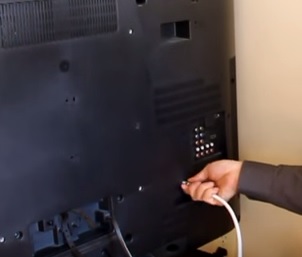
Most homes will need an Antenna that simply plugs into the coax cable port on the back of a TV.

Read here for good HDTV over-the-air TV antennas.

If you live in a big city close to the broadcast towers, a small inexpensive indoor antenna may be enough to receive stations, although usually, a better digital antenna needs to be bought for the best results.

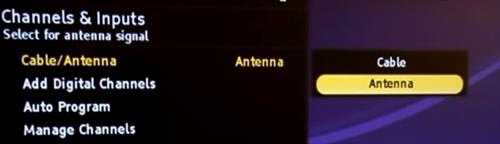
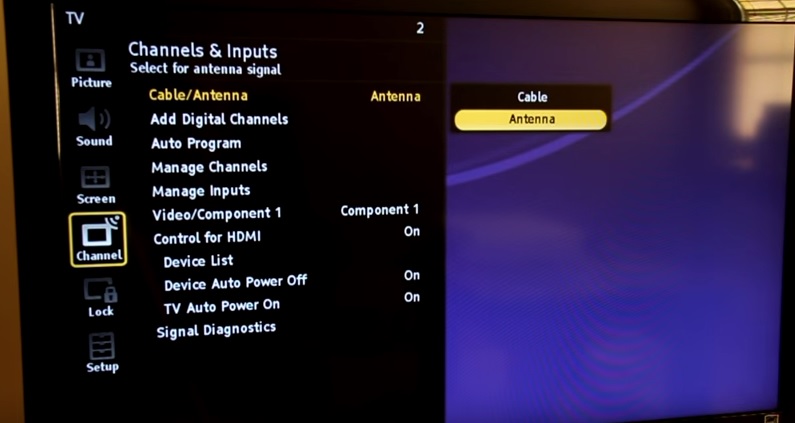
To start picking up stations, select the TV, Antenna, Air, or Live TV option from the input or menu screen on your TV.
How To Get Local TV Channels Without Cable
After the correct option is selected, the TV should scan automatically or have a button to scan for channels.

After the TV is done scanning, you will be able to see which channels it found by simply going through them.

It is also a good idea to rescan every few months, since stations sometimes change frequencies or add new channels.

Unless you live very close to a transmission tower, most often, an antenna must be bought that can boost a signal.

An antenna can range from small indoor-sized units to larger outside units that can be placed on a roof or other high place.

What is NextGen TV (ATSC 3.0)?

NextGen TV, also called ATSC 3.0, is the newest over-the-air broadcast standard and is being rolled out by stations across the country.

It can carry 4K picture, HDR, and better sound, but a TV or tuner box with an ATSC 3.0 tuner is needed to watch it.

The good news is the same antenna will work, there is no such thing as a special NextGen TV antenna.

Right now, stations that broadcast NextGen TV still send out the older standard that current TVs use, so there is no need to rush out and buy anything.

The FCC is working on rules that will eventually let stations turn the older signal off, but as of this writing, no firm shutoff date has been set.

Some NextGen TV channels are also encrypted, which can cause problems with some tuners, so it is a good idea to check reviews before buying a NextGen TV tuner box.

Local TV Channels With the Internet: Using Streaming Apps

If you have a good internet connection, local channels and a lot of other content can also be watched using streaming apps.

These apps can be used on a smart TV, a streaming stick such as a Roku or Fire TV, a phone, or a computer.

Some of these apps are free and some are paid, with the paid options costing anywhere from a few dollars to about the same as cable.

Free Local News Apps

If all you want is your local news, there are free apps that stream live newscasts from local stations.

NewsON is one of the most popular, with free live and on-demand newscasts from over 285 local stations, and no login needed.

Other free local news apps include Zeam, which now owns NewsON, Local Now, and Very Local, which carries Hearst-owned stations.

Which app works best will depend on your area, since each one has partnerships with different stations.

Free Network Apps

The major networks such as ABC, NBC, FOX, and CW have their own apps and websites where many shows can be watched, usually a day or so after they air.

The CW app is free, while some of the other network apps may ask you to sign in with a TV provider to watch everything.

Free Streaming Apps

There are also many free streaming apps that have a lot of movies, TV shows, and live channels, all paid for by ads.

While these do not carry your full local channels, they are a great way to fill in the gaps.

Popular free options include:

Tubi – A large library of free movies and TV shows, along with some live channels.

The Roku Channel – Free movies, shows, and hundreds of live channels, and it works on more than just Roku devices.

Pluto TV – Works much like a cable TV guide, with hundreds of live channels to flip through.

Xumo Play – Hundreds of live channels and no account needed.

Sling Freestream – A free version of Sling with a large lineup of live channels.

Amazon Prime Video – Has a free section with ads that replaced the old Freevee app, no Prime membership needed.

Many smart TVs also come with their own free channels built in, such as Samsung TV Plus on Samsung TVs.

If you have a library card, Kanopy and Hoopla are also worth checking out, since they have movies and shows free with no ads.

If you want the live local channels without an antenna, there are paid live TV streaming services that carry them.

These include YouTube TV, Hulu + Live TV, Fubo, and DIRECTV, which carry most major local networks in most areas, along with cable channels such as ESPN.

Sling TV is a cheaper option but only carries some local channels in some markets.

The downside is these services usually cost around $80-90 a month, which is not far off from a cable bill.

If you only care about one network, Paramount+ carries your local CBS station, and Peacock’s higher plan carries your local NBC station, for a lot less money.

Paid on-demand websites also include Netflix, Hulu, and Amazon Prime Video, although these do not carry local channels.

Paid options will need to be researched for what content and local channels they have in your area.

If you can get a bit technical, there are also streaming apps that work well.

Combine an Antenna With the Internet

Another option is a network TV tuner such as a Tablo or HDHomeRun, which connects an antenna to your home network.

This lets you watch free antenna channels on any TV, phone, or tablet in the house, without running coax cable to every room.

Many of these also have a DVR so shows can be recorded, giving the best of both worlds.
 
Summary
Location and the type of antenna used will determine your over-the-air local channel user experience.

Since everyone will have a different outcome expected, it is best to see what is available in your locality.

For example, someone cutting the cable cord will no doubt benefit from a bigger antenna that can pick up a station from farther away.

While someone else may simply want basic local TV channels, and not care about distance.

With NextGen TV being rolled out, over-the-air TV is only going to get better in the coming years.

For those with the internet, there are also many online options to choose from, including paid and free.

Free apps have a lot of content to watch with many old movies and TV series, and free local news apps can fill in if an antenna does not work well in your area.

Paid live TV streaming services carry local channels too, but they cost about as much as cable, so an antenna is still the best deal.

For those who can get technical, there are also many options along with many YouTube videos and sites with instructions.


3 thoughts on “How To Get Local TV Channels Without Cable for Free”

  1. Ryan

    There are sites where you can scan for what type of an antenna you may need, the height it should be & how many channels you can get in the area you live.

    Reply ↓

Leave a Reply

Your email address will not be published. Required fields are marked *