
USB WiFi adapters work very well at connecting a desktop, laptop, or other electronics wirelessly to a router.
This makes it easy to set up a wireless signal and get online.
There are many USB WiFi dongles available with our favorite options below, along with full reviews, compatibility, and speed.
WiFi has changed a lot the last few years with new protocols, a new naming scheme, and a whole new frequency band.
What Makes a Good Wireless USB Adapter?
A good wireless USB adapter will be fast with good connectivity that does not drop a signal.
Most will work well up-to roughly 50 feet. If more distance is needed a unit with an external antenna would be a better option.
Also, a unit with new wireless protocols will have better WiFi speeds.
One thing that is easy to overlook is the USB port itself. A fast adapter plugged into a USB 2.0 port will bottleneck no matter how good the WiFi chipset is, so a USB 3.0 port is a must for anything WiFi 6 or newer.
WiFi Protocols New Naming Scheme and Speeds

WiFi has been upgraded with new protocols and naming schemes.
Wireless-AX WiFi 6 (802.11ax) is now the baseline most people should be looking at, and WiFi 6E adds the 6GHz band on top of it.
The newest protocol in use is 802.11be, called Wi-Fi 7. It was certified back in 2024 and by now there are routers, laptops, and USB adapters all using it.
There is also Wi-Fi 8 (802.11bn) being worked on, but it is not expected to be finished until around 2028 so there is no reason to wait on it.
Having the newest wireless protocols doesn’t automatically make an adapter the best.
Build quality, speed, range, antenna size, driver support, backward compatibility, and more all need to be considered.
Below we list the best WiFi USB adapters currently available along with reviews to see if one is a good pick for you.
As always be sure to read the reviews on Amazon, here, elsewhere to be sure a unit is a good fit for your set up.
*This site contains affiliate paid links for which a commission earned.
Our Picks for Best Wireless USB Adapters
- Netgear Nighthawk A9000 WiFi 7
- TP-Link Archer TBE401UH WiFi 7
- D-Link AX1800 WiFi-6 Adapter
- Alfa AWUS036ACHM
- Alfa AWUS036ACH
- BrosTrend AC3
- Panda PAU09
- EDUP AC600
- Inamax 1200
- Panda PAU06
- Edimax EW-7811Un

Netgear makes one of the few name-brand Wi-Fi 7 USB adapters with the Nighthawk A9000.
It is a tri-band unit working in the 2.4GHz, 5GHz, and 6GHz bands and uses a USB 3.0 connection.
Being a Wi-Fi 7 device it supports the newer features like 4096-QAM and Multi-Link Operation (MLO), which lets it use more than one band at the same time.
It also uses WPA3 security which is a big improvement over the older WPA2 protocol.
Keep in mind a Wi-Fi 7 adapter needs a Wi-Fi 7 router to see any of the new speeds, and drivers are Windows 11 only.

TP-Link has a BE6200 Wi-Fi 7 USB adapter called the Archer TBE401UH.
It is tri-band 2.4GHz/5GHz/6GHz with two high gain antennas which is a big help for a desktop sitting away from the router.
Unlike the small nano style Wi-Fi 7 dongles the external antennas make a real difference in range.
It runs on a USB 3.0 port and supports WPA3, 4K-QAM, and 160MHz channels.
TP-Link is a well known brand and their driver support is usually better than the no-name units, which matters more with the newer protocols.
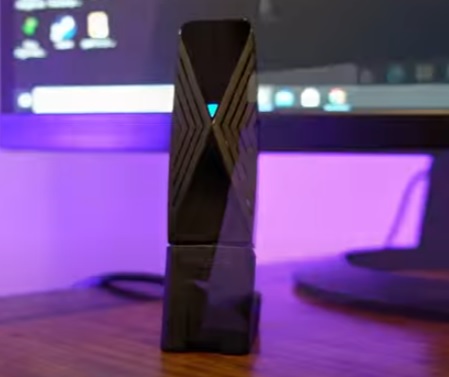
D-Link is a well-known wireless manufacturer that makes many wireless-related types of equipment, including this WiFi-6 USB adapter.
It is dual-band 2.4 GHz and 5 GHz with a rated top speed of 1800Mbps.
While testing, the unit was very impressive, with a wireless speed of 454Mbps, which was the fastest USB WiFi adapter we had tested at the time.
It also uses a USB 3.0 for faster transfer speeds.
Like all WiFi-6 devices, it can use the new WPA3 security, which is a big improvement over the older WPA2 wireless security protocol.
Note the original hardware revision (rev A) is going end of support, so look for the newer DWA-X1850-B1 version which ships with a USB cradle and has current Windows 11 drivers.
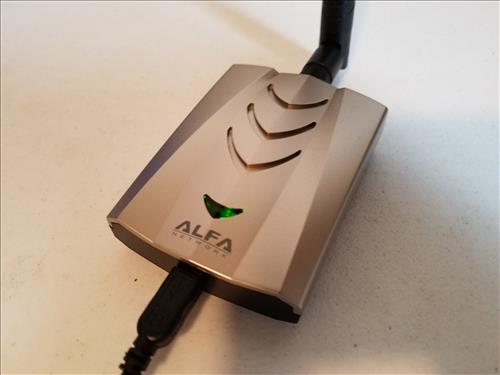
Alfa has a dual-band USB WiFi adapter that works with the WiFi-5 802.11ac protocol.
It is a larger WiFi adapter built for speed and distance along with a 5dbi antenna for good range.
This makes it a good fit for a desktop or laptop that needs a better wireless signal.
It also has broad compatibility with almost any operating system, including Mac, Windows, and Linux.
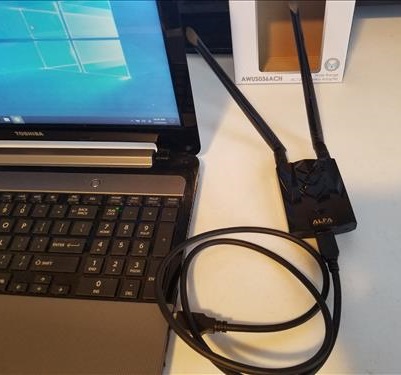
The Alfa AWUS036ACH is an 802.11AC USB adapter built for fast WiFi speeds with good distance.
It comes with two 5dBi antennas that greatly improves the WiFi signal.
It is also compatible with most any Operating System from Windows 11 to Kali Linux.
During our test, it worked with Windows 11 basically plug-and-play with some impressive wireless speeds, 213Mbps Download, and 21Mbps Upload.
Alfa USB adapters are widely used in the Pen Testing community for their strong Chipsets and screw on antennas that can be easily changed out for larger ones.
The RTL8812AU chipset it uses is older now, but the drivers are mature and well supported which is why it is still a favorite.
The AWUS036ACH from Alfa uses a Type-C USB connector which is backward compatible with older USB standards.
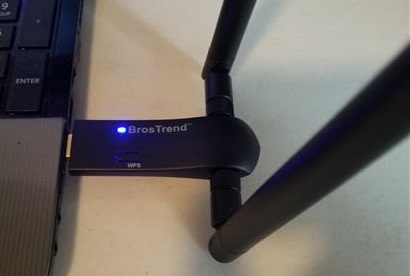
The BrosTrend AC3 is a USB WiFi adapter that has two 5dBi antennas to help get a better wireless signal.
The adapter uses the 802.11AC (WiFi 5) protocols and is dual band 2.4GHz/5GHz adapter.
It will work with most any device old or new and has a good range.
The unit is bigger compared to many other adapters and would be best plugged into a desktop computer.
During testing in the 5GHz band, it gave some very good speed results of 225Mbps Download, and 20Mbps Upload.
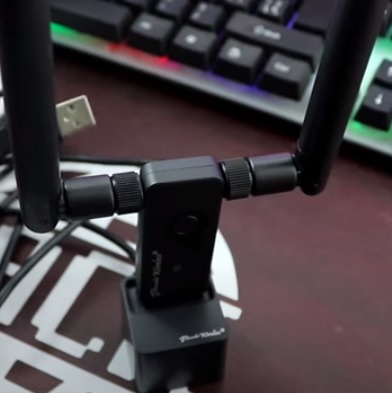
The Panda PAU09 is a good USB adapter that is compatible with most any operating system from Windows to Linux.
It has two large 5dBi antennas for better range and comes with a USB extender to move it around for a better signal if necessary.
It is also a dual-band USB adapter and works in both the 2.4GHz and 5GHz bands.
The one downside it is a Wireless-N dongle with none of the new protocols, and there is no Mac support.
Panda has since released the PAU0F and PAU0G which are AXE3000 Wi-Fi 6E units, so those are worth a look if the newer protocols are needed.
Even though it is only a Wireless-N adapter its low-cost, very good range, and wide compatibility make it worth a look. Just check the price before buying since stock has gotten thin and it sometimes shows up marked way up.
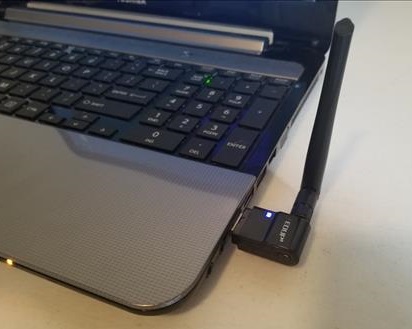
The EDUP AC600 is a Dual Band 802.11ac WiFi adapter that works in both the 2.4GHz and 5GHz frequencies.
It also comes with a screw-on 2dBi antenna to improve range.
802.11AC is still a solid WiFi protocol and works in the 5GHz band.
This makes it a wireless adapter that will work in most any WiFi network.
The 2.4GHz frequency while slower compared to 5Ghz can travel farther and is still widely used when distance is a problem.
While testing the 2.4GHz frequency using wireless-N 57Mbps Download, and 21Mbps Upload.
The 5GHz using the 802.11ac protocol gave some very good results of 213Mbps Download, and 21Mbps Upload.
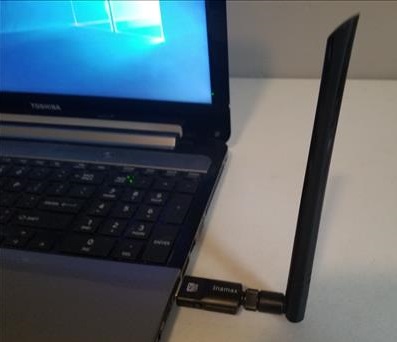
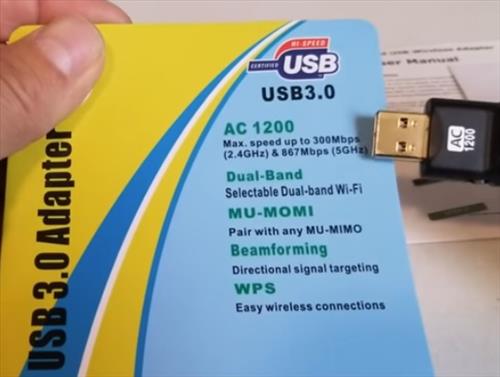
Inamax makes this low-cost WiFi adapter that uses the 802.11AC WiFi-5 protocol.
During testing, the 5GHz band gave the results of 230Mbps Download, and 21Mbps Upload. This was some very good results and one of the faster WiFi-5 units we have tested.
It is a dual-band unit so will also work in older 2.4GHz networks.
It also has a 5dBi antenna to get a better signal making it a very good unit for the money.
This adapter from Panda is a Wireless-N 2.4GHz network adapter with a screw-on/off antenna that gives it good range.
It is only a 2.4 GHz Wireless-N dongle so the speeds are not the best but it works well for those who need more distance from their WiFi.
The Edimax EW-7811Un is a small and convenient wireless dongle. It is an 802.11n 2.4 GHz adapter.
This is not a dongle built for speed or distance since there is no large antenna. If you are looking for a quick reliable cheap WiFi adapter this one will get you online. Just don’t expect it to do wonders.
It is a very old design at this point, but it is still one of the most compatible dongles out there for Linux and single board computers.
Wireless USB Adapter Buyers Guide
When buying a USB network adapter knowing a few things will go a long way to fit your setup.
Finding a USB network adapter that works best for the desktop, laptop, tablet, and router you use is the main objective.
So let’s look at the things that are important to know with WiFi today.
2.4GHz vs 5GHz vs 6GHz Frequencies and Distance
WiFi now runs across three bands, 2.4GHz, 5GHz, and the newer 6GHz.
The thing to remember is the higher the frequency the less distance a wireless signal can reliably travel, and the harder time it has going through walls.
So a dongle using the old 2.4GHz will transmit and receive farther than a 5GHz or 6GHz dongle.
2.4GHz has been used for WiFi since the beginning. The 5GHz band has been around since 802.11a back in 1999, but it did not really take off with home users until 802.11ac (WiFi 5) arrived in 2013.
The 6GHz band is the new one. It was opened up for unlicensed WiFi use in 2020 and is only usable by WiFi 6E and Wi-Fi 7 devices.
Which Band Should You Use?
Simply put there are too many devices talking in the 2.4GHz frequency.
It has become overcrowded which slows everyone down trying to get a signal through.
When a WiFi signal packet collides with another packet it must be resent which slows the network down.
5GHz used to be the empty band but that is not really true anymore. In an apartment building or a packed neighborhood the 5GHz channels are usually busy too.
That is where 6GHz comes in. It is wide open with a lot of channel space and almost nothing using it yet, which is the main reason to look at a WiFi 6E or Wi-Fi 7 adapter.
If you need a signal from a distance and live outside a city with few if any neighbors a 2.4GHz dongle is likely still your best option.
Keep in mind 6GHz does not travel far and does not go through walls well, so it is best for a machine in the same room or close to the router.
802.11 WiFi Protocols
802.11 is what sets the standards for device manufacturers to create their products that all talk together.
Here are the main ones to know.
- Wireless-N WiFi 4 (802.11n)
- Wireless-AC WiFi 5 (802.11ac)
- Wireless-AX WiFi 6 (802.11ax)
- Wireless-AX WiFi 6E (802.11ax with 6GHz)
- Wireless-BE Wi-Fi 7 (802.11be)
The WiFi Alliance has a naming system for wireless protocols that is easier to follow than the old letters.
This includes Wireless-N, now called WiFi 4; Wireless-AC, now called WiFi 5; and Wireless-AX, now called WiFi 6.
The new naming scheme is simply a way for users to understand wireless protocols better.
Wireless-N can work in both the 2.4GHz and 5GHz frequency ranges.
Dongles that work in both 2.4GHz and 5GHz ranges are called Dual Band, and units that add 6GHz are called Tri Band.
Dual Band is ideal for backward compatibility with older devices.
Wireless-AC WiFi 5 (802.11ac) was introduced in 2013 and is much faster than Wireless-N.
802.11ac itself only runs in the 5GHz range, which is why AC adapters fall back to 802.11n when they connect on 2.4GHz. That is how an AC adapter can still be dual band.
Wireless-AX WiFi 6 (802.11ax) came out in 2019 and works in both 2.4GHz and 5GHz. It is a big jump in efficiency on busy networks thanks to OFDMA and MU-MIMO.
WiFi 6E is the same 802.11ax protocol with the 6GHz band added on.
Wi-Fi 7 (802.11be) is the newest one in use. Along with faster raw speeds it added Multi-Link Operation (MLO), which lets a device use two or three bands at the same time instead of picking one.
Wi-Fi 8 (802.11bn) is being worked on now but is not expected to be finalized until around 2028. It is focused on reliability rather than raw speed, so there is no reason to hold off on a purchase waiting for it.
Wireless USB Adapter and Antennas
Internal antennas are good at staying low profile but will not transmit as far as an external antenna.
Adapters that come with an external antenna often use an SMA or RP-SMA connector that will allow for easy-screw-on attachments of different sized antennas. This allows for very cheap solutions to connectivity and distance issues.
An antennas size is valued by its dBi number value, for example a 9 dBi antenna is bigger than a 5 dBi antenna.
Also worth knowing, a lot of adapters now come with a USB cradle or extension cable. Moving the adapter up onto the desk and away from the metal computer case often helps more than a bigger antenna does.
Driver and Operating System Support
Driver support is the thing most people forget to check before buying.
Many of the newer WiFi 6, 6E, and Wi-Fi 7 USB adapters are Windows 11 only with no Mac or Linux drivers at all.
Windows 10 reached end of support in October 2025, so if a unit only lists Windows 10 drivers that is a sign it is an older product.
For Linux, adapters using MediaTek chipsets like the MT7921AU are generally supported in the mainline kernel and work without hunting down drivers.
For Mac users the pickings are slim with the newer protocols, and a lot of what is sold as Mac compatible only covers much older macOS versions.
How To Install and Setup USB Wireless Adapter
- Insert the USB adapter into a USB port, USB 3.0 if the unit supports it.
- A PC will usually install the Drivers automatically.
- Many newer adapters have the driver stored on the dongle itself and will pop up an installer.
- If the Drivers do not install, search online for the manufacturer website to download and install them.
- Once the Drivers are installed you should be able to connect to a WiFi signal
Summary
If you are unsure which USB network adapter will work in your wireless network be sure to get a dual-band dongle at minimum as they will work in almost any network.
Dual-band will work with both the older 2.4 GHz and 5 GHz frequencies, and tri-band units add the 6 GHz band on top of that.
Keep in mind an adapter can not create speeds the router does not have. A Wi-Fi 7 adapter on a WiFi 5 router will only run at WiFi 5 speeds.
Also, be sure your operating system is supported by the dongle and the drivers available.
For example, a Windows 11 PC will need Win 11 Drivers.
The WiFi protocols will also matter since new protocols have more security and speed compared to older ones.
I have a custom built desktop and it doesn’t have builtin WiFi or a CD player, can I still install the drivers automatically like you did in the video? I am usually wired but I’m going to be away from home and I need a wifi adapter.
Generally there is no need to install the driver for Win 10/11, just plug WiFi adapter into your computer, then you can get WiFi signal at the right bottom of your desktop. Then click one WiFi signal that you want, and input the password, you will be connected with your WiFi adapter.
However, if your computer’s operation is not Win 10, then you need to install the driver, but as you said, you do not have WiFi or CD player, then you need to download the driver from the website through wired internet, then installed the driver.
We purchased new four years ago a HP Pavilion HOE series desktop computer Midel No. h7-1160t whose operating system is now Windows 10 Professional. At the time of purchase there were not dual band wireless LAN cards available. The computer came with a single band 2.4GHZ wireless LAN card. Our Internet service provider, Comcast, has installed a Cisco Model No. 3939 dual band gateway in our home. What do you suggest as an upgrade solution to our desktop computer so it can access the 5.0GHZ band and have plug and play compatibility with Windows 10 Professional? We thank you in advance for your much appreciated response!
Is there a WIFI adapter to use on a Android TV box?
Can anyone recommend me the best WiFi adapter for PC gaming with consistent ping and compatible with Window 11?
Thanks, Great List
I bought a TP Link T2U USB duel band mostly to get 5 Ghz access because my HP notebook has a dreadfully poor single band Realtek card. One of the worst cards ever, in my opinion. One thing a notebook should never cheap out on is a wireless card. So anyway bought the T2U and it does well but not great. 5Ghz is basically great for short distances but beyond 15 ft or start adding walls or floors and forget it. The 2 .4 Ghz side out performs the internal card but not by much. Clearly these devices have their limits without external antenna. Mainly because their size does not permit a decent internal antenna.
What is the fastest AC adapter that support Linux/Ubuntu?
I think you can try the BrosTrend AC3L or Panda PAU09, these two models are compatible with Linux Ubuntu I could found on Amazon.
BrosTrend AC3L, AC1200 dual band long range.
Panda PAU09, AC600, dual band long range.
need help install wifi drivers … parrot os … Panda PAU09
Do these adapters support monitor mode , and packet injection for the alpha I am pretty sure it does the rest i don’t know.
Read here for compatible Monitor Mode USB adapters. https://www.wirelesshack.org/best-kali-linux-compatible-usb-adapter-dongles.html
I have the Alfa and the paddle antennas. I was able to hit the hotel router about a mile away, but needed a guest password. LOL Still, I was connected to the router.
I was using the Netgear dual band and after we got fiber optics I was getting 60Mbps upstairs in the front of the house. With the stick antennas on the Alfa I was getting 80-120 DL speeds and with the paddles I am getting in the 200Mbps range +/-
Very nice with a lot of tests of wifi adapters on this site – only problem is that many of them are useless, as your internet connection is not that fast in some of the tests (50Mbit/s), but even worse though – you are using a 100Mbit/s port along the way when doing iPerf tests on your internal network – so we can never see how fast the adapters actually are..
You should buy a 1 Gbit/s switch and test all adapters again 😀 Please :D:D
Hi
I hope you don’t mind me contacting, but I need some advice about what to buy.
My TV is connected to my Sky box that has a Freeview card in it. Tv is also Freeview.
I want to use the Fire TV stick but don’t have an internet connection to the TV.
I bought a wireless dongle to put into the TV in the hope that it would pick up the wireless broadband. (I have Sky downstairs and our phones, laptops and tablets are connected to it wirelessly)
Is there dongle I can buy that I can put into either USB or HDMi port that will connect my TV to the broadband. I suspect I might need a dongle with an Aerial.
Would be very grateful for your help
Many thanks
Lesley
There isn’t any compatible USB wireless adapters for TVs but there is Ethernet to WiFi adapters.
You need to provide the detected vendor and device ID when plugged into Linux usb so that the device can be looked up at linux-hardware[.]org
You need to provide the internal chip vendor and model
For each device you should provide the output of iw phy2 info
For each device, please provide the results of a WPA3 interoperability test as access point and client tested against proprietary software such as macOS
My building recently installed free wi-fi. I bought an AC600 dual band USB that came with an instalation disc. It worked fine at first but now it is sporadic.
I am wondering if an adapter with an attached antenna will pick up better. Also wonder if the issue is with the recently installed system.
Any thoughts are appreciated.
Obviously now it is working, but it is driving me nuts
Thanks
Rich
Nice post. Thank you so much for sharing.
good but what is the best for you ?
realtek driver seems depreciated on linux