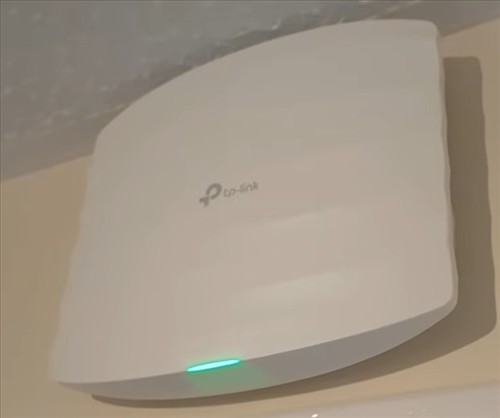
Power Over Ethernet (PoE) access points are the most reliable way to extend a WiFi signal.
They can be used in many scenarios, from adding WiFi to a detached garage to covering a backyard or simply extending internet access to a dead spot in the house.
What is a PoE Access Point?
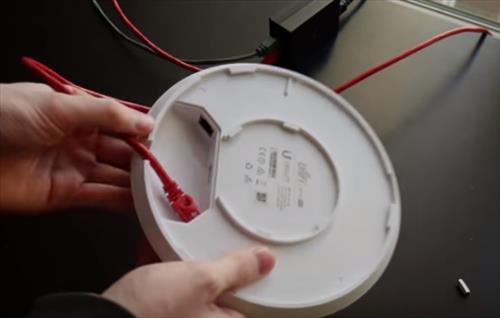
A PoE access point gets both its data and its power over a single Ethernet cable.
PoE (Power over Ethernet) has a lot of advantages over standard power supply devices.
An Ethernet cable can simply be run to a location and plugged into an Access Point, giving power and data to it.
This makes for a simple and clean setup with no need to run extra power lines or find an outlet near the ceiling.
If you have never set up a PoE access point before, they are easy to install. Run a Cat 5e/6 cable from a PoE switch or a PoE injector to the access point, and the power and data will travel over the same line.
For example, here, the PoE connection is run to the access point, and the LAN port is run to the router.
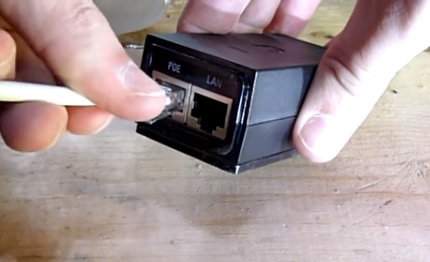
Some PoE access points come with a power injector, but many newer units do not, so be sure to read what comes in the package.
If you are setting up more than one access point, a PoE switch is often easier than using several injectors.
The power and data will travel over the Ethernet line which the PoE injector makes easy.
PoE Standards to Know
Not all PoE is the same, and it is important to match the access point with the right power source.
802.3af (PoE) supplies up to 15.4 watts per port and is enough for older and smaller access points.
802.3at (PoE+) supplies up to 30 watts per port and is what most newer WiFi 6 and WiFi 7 access points need.
802.3bt (PoE++) supplies up to 60 or 90 watts per port and is used by high-end access points and other power-hungry devices.
A PoE+ switch or injector will also power 802.3af devices, so PoE+ is usually the safest choice when buying new equipment.
There are many units to choose from with our favorite options below.
As always be sure to read the reviews on Amazon, forums, or elsewhere to be sure a unit is a good fit for you.
*This site contains affiliate paid links for which a commission earned.
Our Picks for Best POE Power Over Ethernet Access Points
- TP-Link Omada EAP225 AC1350
- TP-Link Omada EAP650 AX3000 WiFi 6
- Ubiquiti UniFi U7 Pro WiFi 7
- TP-Link Omada EAP610-Outdoor AX1800
- Amazon eero PoE 7
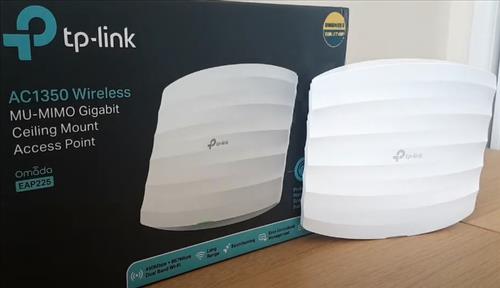
The TP-Link EAP225 is still a very good budget WiFi access point that can be powered through an Ethernet cable or a standard power supply.
To power it from an Ethernet connection, it uses 802.3af PoE (or an 802.3at PoE+ switch), and it can also run from a 12V DC power adapter.
It uses the WiFi 5 (802.11ac Wave 2) protocol and is a dual band 2.4GHz/5GHz unit with speeds up to 450Mbps on 2.4GHz and 867Mbps on 5GHz.
Dual Band 802.11ac devices are backward compatible with older devices and will work with wireless-N or even legacy wireless-G.
It uses 2×2 MU-MIMO technology and is part of the TP-Link Omada system, so it can be managed from the Omada app and used with other Omada access points for seamless roaming and mesh.
It is an older WiFi 5 unit, but for adding WiFi to a garage, shop, or small office it is hard to beat for the price.

If you are looking for a WiFi 6 unit that will boost a WiFi signal without spending a lot, the TP-Link EAP650 is worth a look.
It is a dual band WiFi 6 access point with speeds up to 574Mbps on 2.4GHz and 2402Mbps on 5GHz.
It supports 160MHz channels on 5GHz, which gives newer WiFi 6 devices a big speed boost.
It is powered by 802.3at PoE+ or the included DC power adapter, so it is easy to install almost anywhere.
Like the EAP225, it works with the Omada system for mesh, seamless roaming, and remote management from the Omada app.
It is a good PoE unit that would be a good fit for the average WiFi user.

Ubiquiti UniFi access points are very popular, and the U7 Pro is the newer WiFi 7 replacement for the older UniFi AC Pro, which has reached end of life and no longer gets firmware updates.
It is a tri-band WiFi 7 unit that adds the 6GHz band along with 2.4GHz and 5GHz, and it can handle over 300 connected devices.
It has a 2.5GbE port and is powered by 802.3at PoE+, but it does not come with a PoE injector, so you will need a PoE+ switch or injector.
The UniFi system will allow you to set up guest networks, limit the bandwidth a user can get, see who is connected, stop huge bandwidth users, and much more.
The system can even be set up with different passwords for different users (PPSK) so no single password is needed.
You will need a UniFi controller such as a UniFi Cloud Gateway or the UniFi Network app to set it up, which makes it a better fit for users who like to tinker or small businesses such as motels.
The Ubiquiti U7 Pro is a great system that runs over Ethernet and has a lot of options to fit almost any scenario.
If you need WiFi outdoors, such as a backyard, pool area, barn, or parking lot, the TP-Link EAP610-Outdoor is a good choice.
It is an outdoor weatherproof WiFi 6 unit built to handle rain, dust, and heat.
It is also a dual band unit working in both the 2.4GHz and 5GHz frequencies with combined speeds up to 1800Mbps.
It supports 802.3at PoE+ and passive PoE, and this version comes with a PoE injector in the box.
It uses omni-directional antennas, so it covers the area all around the unit rather than pointing the signal in one direction.
It also works with the Omada system, so it can roam and mesh with the indoor TP-Link units above.
The eero PoE 7 is a good option for homeowners who already use an eero mesh system and want to add a ceiling-mounted access point.
It is a tri-band WiFi 7 unit that covers up to 2,000 sq. ft. and supports 200+ connected devices.
It has two 10GbE ports, and it needs an 802.3at PoE+ switch or injector when powered over Ethernet.
Setup and management are done from the eero app, which is much simpler than most business access points.
It only works with eero systems and it is on the expensive side, but if you already have eero it is the easiest way to add PoE WiFi to your home.
What Ethernet Cat Cable Version Can be Used for PoE?
Cat 5e and Cat 6 are the most common Ethernet cable versions used with PoE.
Cat 5e is currently the most commonly used Ethernet cable type used with PoE since it has good data transfer speeds at a lower cost, and it supports speeds up to 2.5Gbps on runs up to 328 feet (100 meters).
If you want to use the 10GbE ports on some newer access points, Cat 6a is the better choice.
Cat 7 and Cat 8 are more expensive and are not needed for PoE access points. Cat 8 is designed for short runs in data centers.
Be sure to use solid copper cable and avoid cheap copper-clad aluminum (CCA) cable, which can overheat and cause problems with PoE.
Summary
Power over Ethernet makes setting up access points easy compared to past setups.
They run both the data and the power over a single cable, which eliminates the need to run extra power lines.
If you want to power a device that does not support PoE, there are PoE adapter cables for conversion.
Do you know of a good Power Over Ethernet access point? Let us know in the comments below.
What about a Cisco Aironet with autonomous firmware? $9 on eBay and you can save the earth from one more piece of Cisco E-waste…
I think it would be wise to point out that the Ubiquiti products DO NOT HAVE A TECH SUPPORT LINE, so all trouble shooting will have to be done via their forum and through “communities”.
…to add, I cannot speak for the other products on the list, but only from my own experiences with Ubiquiti.